기기에서 출발Start with a device
냉장고에서 재료를 확인하고, 다른 앱에서 레시피와 일정을 따로 찾습니다.Check ingredients on one device, look up recipes in another app, then check everyone’s timing separately.
03 · AI Home UX 전략 · 개인 콘셉트03 · AI Home UX strategy · Independent concept
가족이 함께 쓰는 AI를 설계하다Designing AI for a shared home
가족이 저녁을 준비하려면 사람, 일정, 재료, 가전을 함께 고려해야 합니다. 앱을 하나씩 여는 대신 생활 속 목표부터 시작하고, 공유 화면에서는 모두가 봐도 되는 정보만 보여 주는 AI 경험을 설계했습니다.Getting dinner ready can mean juggling people, schedules, ingredients, and appliances. I designed a concept that starts with that household goal, not a list of apps, and treats the shared screen as a place for information everyone nearby can safely see.
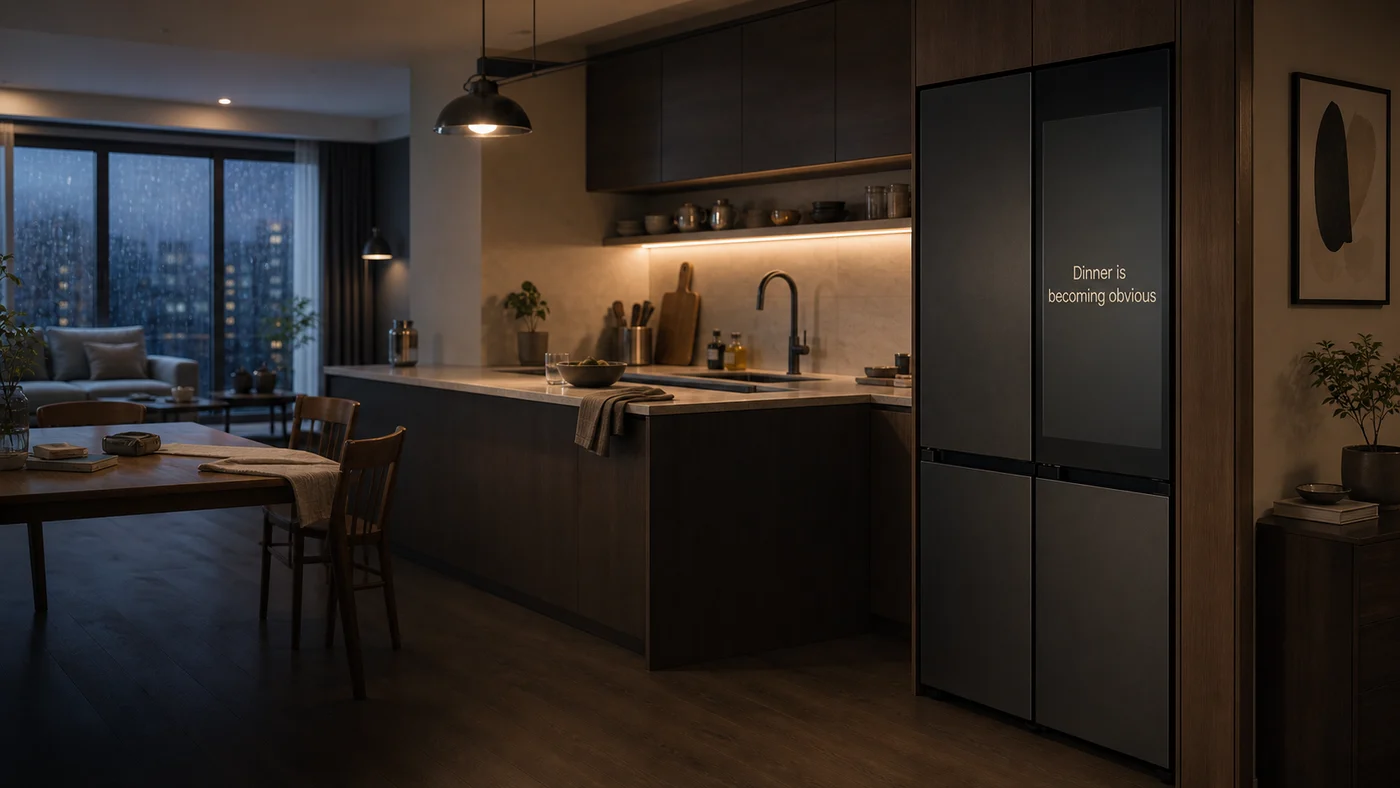
냉장고 화면이나 스마트홈 앱은 기기 상태를 확인하고 개별 기능을 실행하기에는 유용합니다. 하지만 오늘 저녁을 어떻게 준비할지 결정하려면, 지금 집에 있는 사람과 곧 올 사람의 상황을 맞추고 재료와 조리 시간을 함께 확인해야 합니다. 앱마다 나뉜 정보를 모으는 일은 결국 가족의 몫이었습니다.A display or smart-home app can tell you how a device is doing or let you control it. But getting dinner ready means considering who is home or on the way, what ingredients are available, and how long cooking will take. When each tool answers only one of those questions, the family still has to put the answers together.
생활가전사업부 파견 기간(2026.02 – 2027.01) 중 이 문제를 개인 UX 콘셉트로 구체화했습니다. 앱을 모아 놓은 화면 대신, 가족이 상황에 맞게 다음 행동을 정하도록 돕는 공용 화면을 제안했습니다.I developed this as an independent UX concept during my Digital Appliances assignment (Feb 2026 – Jan 2027). I proposed a shared screen that helps the household decide what to do next, instead of simply collecting apps in one place.
가족을 독립된 계정의 목록이 아니라 관계와 역할로 연결된 사람들로 보았습니다. 이 관계 모델(Household Graph)은 집에 누가 있는지, 누가 곧 오는지, 어떤 사람이 어떤 정보를 볼 수 있고 누가 행동을 승인할 수 있는지 구분합니다.I modeled the household as a set of relationships, not a list of accounts. The Household Graph distinguishes who is there, who is expected, who may see particular information, and who can approve an action.
기기에서 출발Start with a device
냉장고에서 재료를 확인하고, 다른 앱에서 레시피와 일정을 따로 찾습니다.Check ingredients on one device, look up recipes in another app, then check everyone’s timing separately.
생활 목표에서 출발Start with a household goal
‘오늘 같이 저녁을 먹자’에서 시작합니다. 동의한 범위에서 일정과 재료를 확인하고, 알맞은 메뉴와 다음 행동을 연결합니다.Start with “Let’s eat together tonight.” Use only permitted signals to check timing and ingredients, then connect a suitable meal with the next practical step.
Cover는 홈 화면이 아닙니다. 평소에는 생활 공간의 배경으로 머물고, 지금 가족에게 도움이 되는 정보가 있을 때만 조용히 드러냅니다. 다음 행동이 필요할 때는 앱을 고르는 대신 해당 목적에 맞는 작업 화면으로 이어집니다.Cover isn’t a home screen. Most of the time it stays in the background. It surfaces something only when the household can use it, then opens a workspace for the task at hand rather than sending people to an app launcher.
사람이 없을 때는 화면이 주의를 끌지 않고, 개인 정보도 보여 주지 않습니다.When no one is there, the screen does not ask for attention or show personal information.
앱 목록을 띄우지 않습니다. 지금 알려 줄 이유가 있을 때만 함께 봐도 되는 단서 하나를 남깁니다.No app grid. When something is worth surfacing, show one cue that’s safe for everyone nearby.
시간과 상황이 맞으면 제안과 이유를 짧게 보여 줍니다. 함께 보는 사람이 바뀌면 정보 범위도 달라집니다.Offer a brief suggestion and the reason for it. If the audience changes, so does what the screen may reveal.
선택지와 다음 행동을 한곳에서 확인합니다. 메시지 발송, 구매, 가전 작동은 승인 후 진행합니다.Compare options and see what happens next in one place. Sending a message, buying something, or starting an appliance requires approval.
개인 정보는 관계와 권한에 따라, 지금 화면 앞에 있는 사람이 봐도 되는지 판단합니다. 보는 사람이 확실하지 않으면 공용 화면에는 민감한 내용을 띄우지 않고, 필요한 경우 권한이 있는 사람의 개인 기기로 이어집니다.Visibility depends on relationships, permissions, and who is actually in front of the screen. If the audience is uncertain, sensitive content stays off the shared display; where appropriate, it can move to an authorized person’s device.
Dinner Intent는 레시피를 찾는 일이 아니라, 가족이 오늘 함께 먹을 수 있는 저녁을 정하는 일에 초점을 맞췄습니다. 상황을 파악하는 것, 제안하는 것, 실행을 승인하는 것은 각각 다른 단계입니다.Dinner Intent is about agreeing on a meal the family can actually share tonight, not finding a recipe. The design separates understanding the situation, making a suggestion, and getting approval to act.
집에 있는 가족은 곧 돌아올 사람과 함께 먹고 싶습니다. 무엇을 만들지, 재료와 시간이 맞는지 확인해야 합니다.Some family members are home; another is on the way. They want to eat together, but need to see what they can make with the time and ingredients they have.
Cover에는 모두가 곧 모인다는 단서만 남깁니다. 누구의 개인 일정인지, 어디에서 오는지는 보여 주지 않습니다.Cover signals that everyone will be home soon. It does not show whose calendar the information came from or where anyone is coming from.
Reveal은 지금 있는 재료와 남은 시간, 가족의 선호를 고려해 저녁 메뉴를 제안합니다. 재료가 있는지 확실하지 않으면 먼저 확인하도록 합니다.Reveal suggests a meal based on the ingredients likely to be available, the time left and what the family likes. If ingredient availability is uncertain, the concept asks the family to check.
Intent Workspace에서 가족이 메뉴를 고릅니다. 필요하면 도착할 가족에게 보낼 메시지나 연동 가능한 오븐의 예열을 검토하고, 확인한 뒤에만 실행합니다.In the Intent Workspace, the family picks a meal and can review a message to the person on their way home or preheat a compatible oven. Neither action runs until someone confirms.
같은 원칙, 다른 상황 · Family MessageThe same rule in a different setting · Family Message
가족 중 한 사람에게 남긴 메시지는 손님이나 다른 구성원이 보고 있을 때 공용 화면에 띄우지 않습니다. 권한이 있는 사람이 혼자 볼 수 있을 때 내용을 전하거나, 본인의 휴대전화에서 확인하도록 합니다.A message for one family member stays off the display when guests or other household members are nearby. The concept waits for a private moment or hands off to the intended person’s phone.
개인 콘셉트의 UX 방향을 정하고, 관계와 권한을 기준으로 공용 화면이 언제 어떤 정보를 보여 줄지 설계했습니다. Cover에서 작업 화면으로 넘어가는 조건을 정리하고, Dinner Intent와 Family Message의 장면을 구체화해 제안과 실행 사이의 경계를 드러냈습니다.I defined the independent concept’s UX direction and worked through when the display should surface information, for whom, and under which permissions. I defined the transitions from Cover to a task workspace and developed Dinner Intent and Family Message scenarios to make the boundary between suggesting and acting explicit.
전략 문서, 경험 구조, 관계·권한 원칙과 시나리오를 정리해 내부에 공유했습니다.I documented the strategy, experience model, visibility rules, and scenarios, and shared the concept internally.
사용자 검증에서 확인할 것은 가족이 조용한 단서를 부담 없이 알아차리는지, 손님이 들어왔을 때 정보 가림이 기대에 맞는지, 그리고 메시지·가전 작동 전에 필요한 확인이 충분히 명확한지입니다.The next questions are whether families notice a quiet cue without feeling interrupted, whether information stays private as the audience changes, and whether confirmation is clear before a message is sent or an appliance starts.